
How to Check Website Traffic Fast: Your Site or Any Site
TL;DR
- To check your own website traffic, use a web analytics tool such as Google Analytics or Pulse.
- To check another site's traffic, use a traffic checker such as Similarweb, Semrush, or Ahrefs. Treat the numbers as estimates.
- Start with five numbers: visitors, pageviews, traffic sources, top pages, and conversions.
- Compare each number with the previous period before you act on a change.
A traffic checker says your competitor gets 50,000 visits a month. The real number could be 5,000 or 100,000. SparkToro's research (opens in a new tab) found that third-party traffic estimates can be off by 100% or more.
Your own website traffic is different. You can measure visits, pageviews, traffic sources, and conversions directly. This guide shows how to check both.
How Can You Check Website Traffic?
You can check your site's traffic with a web analytics (opens in a new tab) tool. For other sites, use a traffic checker. Analytics tools measure real visits. Traffic checker tools model estimates from keyword rankings and sampled browsing data.
| Your goal | Best method | Data type |
|---|---|---|
| See all visits to your site | Web analytics tool (GA4, Matomo, Plausible Analytics, Pulse) | Measured |
| See your Google search traffic | Google Search Console | Measured |
| See a competitor's traffic | Similarweb, Semrush Traffic Analytics, Ahrefs | Estimated |
How to Check Website Traffic for Free With Google Tools
Google offers a free website traffic checker for your own site in two tools. Each answers a different question.
Google Analytics (GA4)
Open Reports, then Acquisition, then Traffic acquisition. The report groups visits by the default channel grouping. Groups include Direct, Organic Search, Paid Social, Organic Social, and Email. By default, GA4 ends a session after 30 minutes of inactivity.
Google Search Console
Search Console shows clicks, impressions, click-through rate (CTR), and average position from Google Search. It does not show visits from direct, email, or social sources. Google also introduced Search Generative AI performance reports in June 2026.
Neither tool shows traffic for a site you do not own.
How to Check Website Traffic With Pulse Analytics
Pulse is a cookieless web analytics tool. It sets no cookies and never stores IP addresses. Your data is stored in Switzerland. The free Personal plan covers one site, 10,000 events a month, and 6 months of data. It includes every feature and needs no card. Business plans start at €9 a month.
Step 1: Add your site and install the script
- Create a Pulse account and add your domain.
- Copy the tag below. Replace example.com with your domain.
- Paste it inside the <head> of the template every page shares.
- Publish your site.
<script defer data-domain="example.com" src="https://js.ciphera.net/script.js"></script>
The script weighs about 3 KB. Pulse lists 73 supported platforms. Common setups include:
- WordPress: official plugin
- Shopify: paste the tag in theme.liquid
- Webflow: custom code on a paid plan
- Next.js: next/script in the root layout
- Ghost: code injection
Single-page applications work. Pulse counts every client-side path change as a pageview.
Step 2: Verify your first pageview
Open your live site. Then open your Pulse dashboard. Your visit should appear there. Pulse respects Do Not Track and Global Privacy Control, so test in a browser with both off. Add ?pulse-ignore=on to your URL to exclude your own visits.
Step 3: Read the overview numbers
The Dashboard opens on five metrics and a daily chart. Each metric compares with the previous period of the same length.
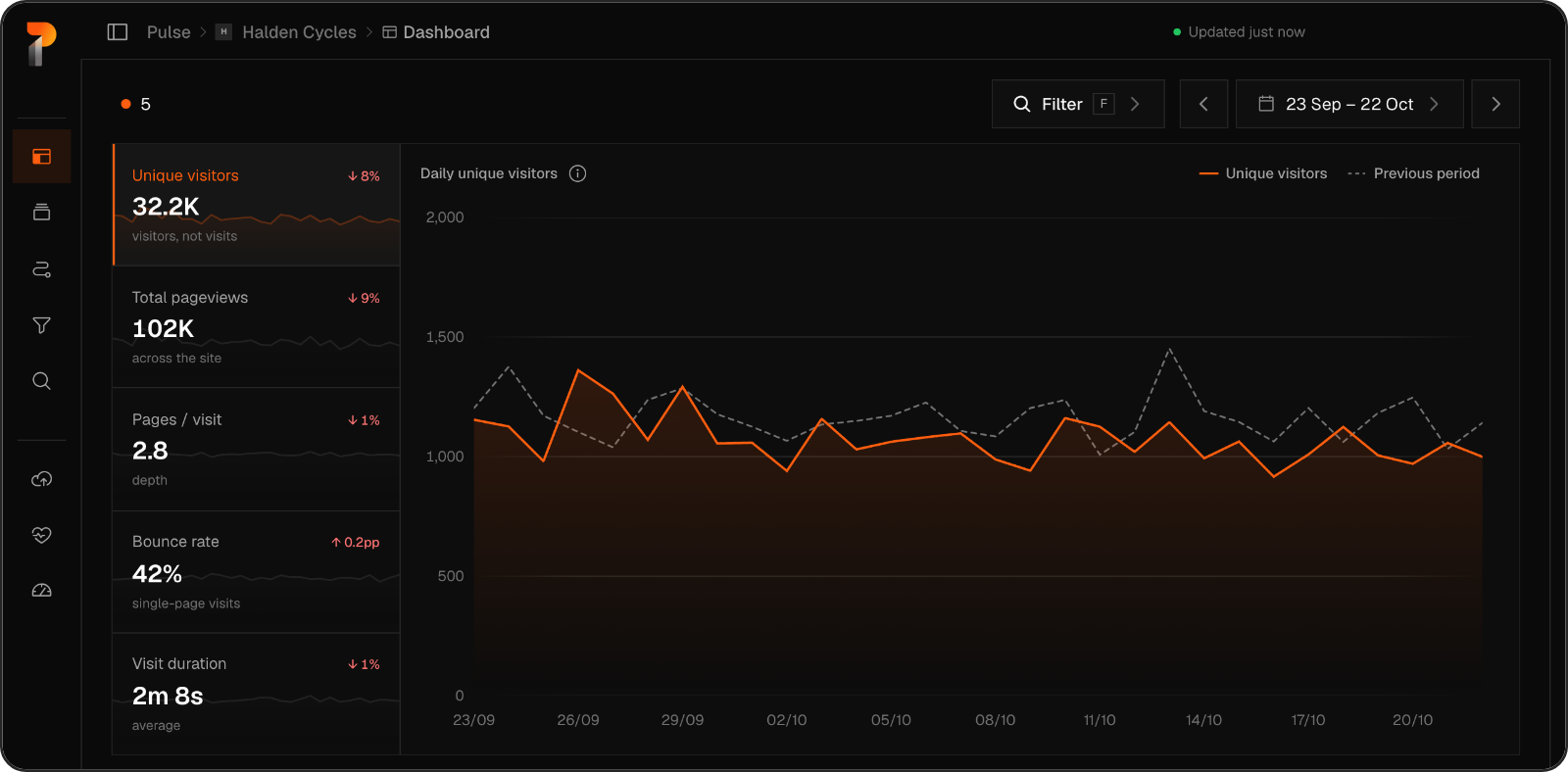
For the sample bike shop in the live demo, the 30 days above read as follows:
- Unique visitors: 32.2K, down 8%
- Total pageviews: 102K, down 9%
- Pages per visit: 2.8, down 1%
- Bounce rate: 42%, up 0.2 percentage points
- Visit duration: 2m 8s, down 1%
Pulse counts a visitor once per day. A range total adds each day's unique visitors. Bounce rate is the share of visits with exactly one pageview. Visit duration leaves out visits that were never measured.
Visitors fell 8% while pages per visit and visit duration barely moved. Fewer people came, and the ones who came behaved as before, so the next question is which source dropped.
Step 4: Find your traffic sources
Open the Sources panel. It has three tabs: Referrers, Channels, and Campaigns.
In the demo, Google sent about 12,000 visitors, Shared Link 5,192, and Direct 4,936. Instagram sent 2,908, and the newsletter 2,295.
Direct and Shared Link both mean Pulse captured no referrer. Direct means the visitor landed on the homepage. Shared Link means they landed on any other page. Messaging apps and email clients often strip referrer information.
The Channels tab sorts visits into twelve groups, such as Organic Search, Organic Social, Email, Referral, and AI. Pulse checks utm_medium first, then the referrer's domain.
Step 5: Check your top pages, entries, and exits
The Pages panel has four tabs:
- Pages: every page ranked by views
- Entries: the first page of each visit (landing pages)
- Exits: the last page of each visit
- Outbound: clicks on links to other sites
The homepage led the demo with about 14,800 visitors and 16,600 views. The bikes page followed with 6,816 visitors and 7,320 views. Landing pages with high bounce rates need a clearer next step.
Step 6: Review your audience and real-time visitors
The Countries and Browsers tabs show who visits. The demo shows Norway with 9,804 visitors, Sweden with 5,396, and Germany with 3,870. Chrome led with about 13,600 visitors, just ahead of Safari. The toolbar counter shows people on your site in the last 5 minutes.
Step 7: Track campaigns with UTM parameters
Add UTM parameters to links you share outside your site. Pulse reads five:
- utm_source
- utm_medium
- utm_campaign
- utm_content
- utm_term
Use the Pulse UTM builder (opens in a new tab) to create tagged links. The Campaigns tab then groups traffic by source, medium, campaign, content, or term. Untagged traffic never appears there. Never add UTM tags to internal links. They overwrite the visitor's original source.
Step 8: Measure conversions
Send a custom event for each action that matters, such as pulse.track('add_to_cart'). Conversion rate is the share of all visitors in the range who sent the event.
In the demo, 1,895 visitors added something to the cart, 5.9% of all visitors, and 283 bought something, 0.9%. Conversion rate measures traffic quality better than visit volume does.
Step 9: Track AI referral traffic
AI assistants now send visitors. Examples include ChatGPT, Google Gemini, Perplexity, Microsoft Copilot, and Claude. Open the Channels tab and read the AI row.
The numbers are small but useful:
- AI referral traffic made up 1.08% of website traffic across 10 industries, and ChatGPT sent 87.4% of it. Conductor (opens in a new tab) measured US traffic to 1,215 enterprise domains from May to September 2025.
- LLM-referred visitors signed up at 1.66%. Search visitors signed up at 0.15% and social visitors at 0.46%. Microsoft Clarity (opens in a new tab) analyzed 1,277 sites.
Referrer-based tracking misses AI visits that arrive without a referrer. Those visits fall into Direct or Shared Link. Chatbot crawlers also skip JavaScript trackers, so only your CDN or server logs record them.
You can also ask an AI assistant about your own data. Pulse connects to ChatGPT, Claude, Cursor, and VS Code through MCP. These assistants read your data and never change it.
Step 10: Diagnose a traffic spike or drop
Check these items in order:
- Tracking: confirm the script is live and the data domain matches your registered domain.
- Scope: check whether every metric moved or only pageviews.
- Channel: find which source changed in the Sources panel.
- Quality: a spike with no conversions or visit duration can mean bot traffic.
- Timing: compare against seasonality and recent algorithm updates.
Pulse leaves the bot traffic it detects out of your numbers.
How to Check Website Traffic of Other Websites
No tool can see another site's real analytics. Competitor traffic estimation combines keyword rankings, search volume, assumed CTR, and clickstream data from sampled browsing. Follow these steps:
- Enter a competitor's domain in Similarweb, Semrush Traffic Analytics, Ahrefs, Serpstat Domain Analysis, or Ubersuggest.
- Read organic traffic estimates, top pages, and traffic sources.
- Repeat in a second tool and compare the direction of the trend.
- Add your own first-party numbers as the benchmark.
Accuracy varies. Ahrefs (opens in a new tab) compared its US estimates with Search Console data for 1,635 sites, and for a typical site the estimate was off by about half.
Use estimates to compare sites and trends. Do not use them for exact figures.
What Are the Key Website Traffic Metrics?
A website traffic analysis answers one question: what should you change? Read these metrics first.
| Metric | What it answers | Where in Pulse |
|---|---|---|
| Unique visitors | How large is your audience? | Dashboard |
| Pages per visit | How much do people read? | Dashboard |
| Traffic sources | Which channels send visitors? | Sources panel |
| Entry and exit pages | Where do visits start and end? | Pages panel |
| Bounce rate and visit duration | Do visitors engage? | Dashboard |
| Conversion rate | Does the traffic act? | Events panel |
Compare date ranges before you conclude. Connect Google Search Console to Pulse to see queries, clicks, impressions, CTR, and position next to your visitor data.
Why Do Traffic Reports Differ?
Two tools rarely show the same number. Five causes explain most gaps:
- Definitions: one tool counts people per day, another counts visits.
- Bot filtering: tools filter bots and spam traffic differently. Pulse excludes non-human and WebDriver traffic.
- Privacy signals: Pulse respects Do Not Track and Global Privacy Control by default, so those visitors do not appear.
- Consent: cookie-based tools miss visitors who decline.
- Time zones: Pulse counts days in your site's time zone.
Do You Need Consent to Check Website Traffic?
Cookieless tracking reduces consent requirements, but rules differ by country. The EU rule covers reading from a device as well as storing on it. France, Italy, the Netherlands, Spain, and Bulgaria make an exception for a site's own statistics, and so do Iceland, Liechtenstein, the UK, and Switzerland. Most other European countries make none. Our country-by-country guide (opens in a new tab) shows whether a site using Pulse needs a consent banner.
France's CNIL (opens in a new tab) sets conditions for the exemption. Users need notice and a way to object. Data must serve audience measurement only. IP addresses must be truncated, and trackers must last no more than 13 months.
Try Pulse Analytics
Pulse measures your website traffic without cookies, and the free plan covers one site with 10,000 events a month.
FAQ
Frequently Asked Questions
How accurate are website traffic checkers?
They are directional. Studies found gaps of about 50% for a typical site and 100% or more at worst. Your own analytics are more accurate.
Do I need a cookie banner to check website traffic?
It depends on your country and your tool. Pulse sets no cookies. Our country-by-country guide gives the answer for each country.
Related Articles



Try privacy-first analytics free
The Pulse script is about 3 KB and sets no cookies. Start on the free Personal plan, or explore the live demo first without signing up.